Programming Tricks
Julia
parentmodule: determine the package a function in Julia
originates from
names: Get a vector of the public names of a Module,
excluding deprecated names
undef: undef is a special marker used when constructing
arrays (including vectors) to indicate that the elements of the array
should not be initialized to any specific value.
collect: return an Array of all items in a collection or
iterator, collect(2:5), collect('B':'D'),
collect("HELLO")
!: a function naming convention to indicate that a
function mutates its arguments in place, meaning the changes will be
visible outside the function. When a function is designed to modify its
arguments, it is good practice to append a ! (exclamation
mark) to its name
eltype: To find the type of the elements that are
iterated over in a collection
typeof: To determine the specific type of any given
value
1 | pizza_tuple = ("hawaiian", 'S', 10.5) |
Any: It is used to construct a heterogeneous array that
can hold elements of any type, like
Any[1, "hello", 3.14]
^: Repeat a regex n times (s^n
is same with repeat(s, n)); Exponentiation operator
parse: convert a text string to anything else.
parse(Int, "42"), parse(Float64, "42")
String * : concatenate strings,
"The " * engine *
String $: string interpolation, use
$(variable) instead of $variable when there is
no whitespace that can clearly distinguish the variable name from the
surrounding text
vec: Reshape the array as a one-dimensional column
vector
pkg> dev|develop: add a local package, which not
initialized by git
load custom module:
1 | include("path/to/MyModule.jl") |
1 | include("path/to/MyModule.jl") |
1 | include("path/to/MyModule.jl") |
create a new project
1 | $ julia |
]
1 | (@v1.12) pkg> generate MyNewProj |
;
1 | shell> cd MyNewProj/ |
]
1 | (@v1.12) pkg> activate . |
activate a Julia environment and execute a file using the command line
1 | julia --project=. your_script.jl |
The --project=. argument tells Julia to look for a
Project.toml and Manifest.toml file in the
current directory (indicated by .)
Sharing Project Environments
instantiate command to download and install all packages
and their dependencies listed in Project.toml (and
Manifest.toml if present)
| Feature / Command | activate |
generate |
resolve |
instantiate |
|---|---|---|---|---|
| Primary Goal | Switch to a specific project folder's context. | Create a brand new project skeleton from scratch. | Recalculate the dependency tree for the current Julia version. | Download and install the specific versions listed in the Manifest. |
| Julia Version Role | Does not check version; just points Julia to a directory. | Creates a Project.toml
compatible with the running Julia version. |
Crucial: Filters package
versions based on the [compat] julia field. |
Uses the Julia version to ensure the Manifest is valid before downloading. |
| Manifest Impact | None. | None (a manifest is only created once you add packages). | Rewrites the
Manifest.toml to match the current Julia environment. |
Follows the existing
Manifest.toml to recreate the environment. |
| Cross-Version Use | Same command works across all Julia versions. | Standard way to start a project regardless of Julia version. | Used to "fix" a Manifest when moving a project to a newer/older Julia version. | Used to "build" the project once
resolve has created a valid Manifest. |
| Error Handling | Rarely fails (unless the path doesn't exist). | Fails if the directory name is invalid or already exists. | Fails if no package versions support your running Julia version. | Fails if the Manifest was built for a different Julia version (pre-1.11). |
dictionary
1 | pizza = Dict("name" => "hawaiian", "size" => 'S', "price" => 10.5) |
A problem with using a dictionary is that it requires every value to be of the same type
1 | typeof(pizza) # Dict{String, Any} |
symbols
It is denoted by : (colon), followed by the name of
the symbol, built-in Julia type to represent identifiers
named tuples
1 | pizza = (name = "hawaiian", size = 'S', price = 10.5) |
A named tuple only allows you to use symbols as keys
All types of tuples are immutable, meaning you cannot change them
implicit naming from identifiers
1 | x = 0 |
composite type (struct) &
type annotation
:: is used to annotate variables and expressions with
their type. x::T means variable x should have
type T. It helps Julia figure out how many bytes are needed
to hold all fields in a struct
1 | struct Archer |
closure
varargs
"varargs" (variable arguments) refers to the ability of a function to
accept an arbitrary number of arguments. This is achieved using the
splat operator (...) in the function
definition.
1 | function my_sum(a, b, rest...) |
1 | my_sum(1, 2, 3, 4, 5) # 15 |
keyword arguments
a semicolon (;) separates positional arguments
from keyword arguments in the function signature. All arguments to the
right of the semicolon are treated as keyword arguments. They can
optionally have default values
views
A view is essentially a
pointer to a sub-section of another vector,
but not a standalone vector itself
1 | one2ten = collect(1:10); |
@viewsis a macro that converts sliced arrays into views (pointers are much cheaper than creating copies of arrays). For more information on how to use theviewsyntax correctly
semicolon after steprange
placing a semicolon ; after a step range expression
inside square brackets, e.g., [1:10;], changes the
resulting object from a UnitRange to a
Vector
1 | b = [1:2:10] # Vector{StepRange{Int64, Int64}} |
element-wise operations
Dot syntax for operators: For binary operators like
+, -, *, /,
^
Dot syntax for functions: For functions, the dot is placed after the function name.
Property destructuring
1 | julia> (; b, a) = (a=1, b=2, c=3) |
One-line functions
"one-line function" also known as the compact "assignment form"
1 | function_name(parameters) = expression |
Anonymous Functions (Lambda Functions)
functions without a name (parameters) -> expression,
often defined inline for use with higher-order functions like
map, filter, or reduce
1 | numbers = [1, 2, 3] |
do keyword is syntactic sugar for
creating an anonymous function and passing it as the
first argument to another function
1 | map([1, 2, 3]) do x |
dostarts the block.x, y(optional) followingdoare the arguments the anonymous function receives.endcloses the block
using vs
import
that’s the difference between using and import - the former brings all exported names into scope, while the latter only brings NiceStuff (the module identifier) into scope.
[https://discourse.julialang.org/t/difference-between-include-use-and-import/65918/5]
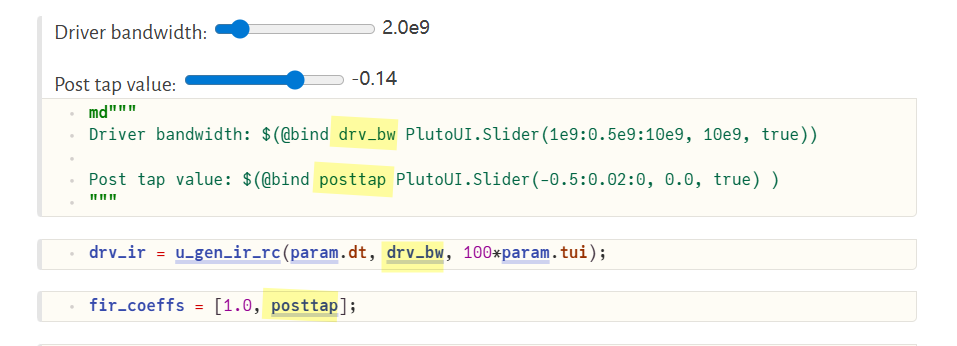
PlutoUI.Slider
Observable
The argument to the Observable()
constructor provides both an initial
value and determines the type of the observable
variable.
There are two ways to access/update an observable's value - w/
.val or []
The difference is that only using [] will trigger the
listener event when updating the observable value
| Feature | lift |
on |
|---|---|---|
| Return Value | A new Observable | A Handler (for disconnecting later) |
| Purpose | To transform data (create a dependency) | To perform an action (side effect) |
| Data Flow | Value flows from parent to child | Value triggers an external event |
multiple dispatch
A function can take arguments of diferent types, and share the same name
@. : used for automatic broadcasting
across an entire expression
1 | # Manual broadcasting |
C++ Conditional Compilation
Using g++ only
conditional.cpp
1 |
|
-DDEBUG args
1 | $ g++ -Wall -Wextra -Wconversion conditional.cpp -o conditional |
Using CMakeLists.txt add_definitions
1 | cmake_minimum_required(VERSION 3.2) |
without debug
1 | $ cmake .. |
with debug
1 | $ cmake -DDEBUG=ON .. |