Coding
Julia
create a new project
1 | $ julia |
]
1 | (@v1.12) pkg> generate MyNewProj |
;
1 | shell> cd MyNewProj/ |
]
1 | (@v1.12) pkg> activate . |
pkg> dev|develop: add a local package, which not
initialized by git
load custom module:
1 | include("path/to/MyModule.jl") |
1 | include("path/to/MyModule.jl") |
1 | include("path/to/MyModule.jl") |
activate a Julia environment and execute a file using the command line
1 | julia --project=. your_script.jl |
The --project=. argument tells Julia to look for a
Project.toml and Manifest.toml file in the
current directory (indicated by .)
Sharing Project Environments
instantiate command to download and install all packages
and their dependencies listed in Project.toml (and
Manifest.toml if present)
| Feature / Command | activate |
generate |
resolve |
instantiate |
|---|---|---|---|---|
| Primary Goal | Switch to a specific project folder's context. | Create a brand new project skeleton from scratch. | Recalculate the dependency tree for the current Julia version. | Download and install the specific versions listed in the Manifest. |
| Julia Version Role | Does not check version; just points Julia to a directory. | Creates a Project.toml
compatible with the running Julia version. |
Crucial: Filters package
versions based on the [compat] julia field. |
Uses the Julia version to ensure the Manifest is valid before downloading. |
| Manifest Impact | None. | None (a manifest is only created once you add packages). | Rewrites the
Manifest.toml to match the current Julia environment. |
Follows the existing
Manifest.toml to recreate the environment. |
| Cross-Version Use | Same command works across all Julia versions. | Standard way to start a project regardless of Julia version. | Used to "fix" a Manifest when moving a project to a newer/older Julia version. | Used to "build" the project once
resolve has created a valid Manifest. |
| Error Handling | Rarely fails (unless the path doesn't exist). | Fails if the directory name is invalid or already exists. | Fails if no package versions support your running Julia version. | Fails if the Manifest was built for a different Julia version (pre-1.11). |
Basics
parentmodule: determine the package a function in Julia
originates from
names: Get a vector of the public names of a Module,
excluding deprecated names
undef: undef is a special marker used when constructing
arrays (including vectors) to indicate that the elements of the array
should not be initialized to any specific value.
collect: return an Array of all items in a collection or
iterator, collect(2:5), collect('B':'D'),
collect("HELLO")
!: a function naming convention to indicate that a
function mutates its arguments in place, meaning the changes will be
visible outside the function. When a function is designed to modify its
arguments, it is good practice to append a ! (exclamation
mark) to its name
eltype: To find the type of the elements that are
iterated over in a collection
typeof: To determine the specific type of any given
value
1 | pizza_tuple = ("hawaiian", 'S', 10.5) |
Any: It is used to construct a heterogeneous array that
can hold elements of any type, like
Any[1, "hello", 3.14]
^: Repeat a regex n times (s^n
is same with repeat(s, n)); Exponentiation operator
parse: convert a text string to anything else.
parse(Int, "42"), parse(Float64, "42")
String * : concatenate strings,
"The " * engine *
String $: string interpolation, use
$(variable) instead of $variable when there is
no whitespace that can clearly distinguish the variable name from the
surrounding text
vec: Reshape the array as a one-dimensional column
vector
dictionary
1 | pizza = Dict("name" => "hawaiian", "size" => 'S', "price" => 10.5) |
A problem with using a dictionary is that it requires every value to be of the same type
1 | typeof(pizza) # Dict{String, Any} |
symbols
It is denoted by : (colon), followed by the name of
the symbol, built-in Julia type to represent identifiers
named tuples
1 | pizza = (name = "hawaiian", size = 'S', price = 10.5) |
A named tuple only allows you to use symbols as keys
All types of tuples are immutable, meaning you cannot change them
implicit naming from identifiers
1 | x = 0 |
composite type (struct) &
type annotation
:: is used to annotate variables and expressions with
their type. x::T means variable x should have
type T. It helps Julia figure out how many bytes are needed
to hold all fields in a struct
1 | struct Archer |
closure
varargs
"varargs" (variable arguments) refers to the ability of a function to
accept an arbitrary number of arguments. This is achieved using the
splat operator (...) in the function
definition.
1 | function my_sum(a, b, rest...) |
1 | my_sum(1, 2, 3, 4, 5) # 15 |
keyword arguments
a semicolon (;) separates positional arguments
from keyword arguments in the function signature. All arguments to the
right of the semicolon are treated as keyword arguments. They can
optionally have default values
views
A view is essentially a
pointer to a sub-section of another vector,
but not a standalone vector itself
1 | one2ten = collect(1:10); |
@viewsis a macro that converts sliced arrays into views (pointers are much cheaper than creating copies of arrays). For more information on how to use theviewsyntax correctly
semicolon after steprange
placing a semicolon ; after a step range expression
inside square brackets, e.g., [1:10;], changes the
resulting object from a UnitRange to a
Vector
1 | b = [1:2:10] # Vector{StepRange{Int64, Int64}} |
element-wise operations
Dot syntax for operators: For binary operators like
+, -, *, /,
^
Dot syntax for functions: For functions, the dot is placed after the function name.
Property destructuring
1 | julia> (; b, a) = (a=1, b=2, c=3) |
One-line functions
"one-line function" also known as the compact "assignment form"
1 | function_name(parameters) = expression |
Anonymous Functions (Lambda Functions)
functions without a name (parameters) -> expression,
often defined inline for use with higher-order functions like
map, filter, or reduce
1 | numbers = [1, 2, 3] |
do keyword is syntactic sugar for
creating an anonymous function and passing it as the
first argument to another function
1 | map([1, 2, 3]) do x |
dostarts the block.x, y(optional) followingdoare the arguments the anonymous function receives.endcloses the block
CircularBuffer
| Feature | Vector (Standard) |
CircularBuffer
(DataStructures.jl) |
|---|---|---|
| Push/Pop Front | \(O(n)\) (Shifts all elements) | \(O(1)\) (Updates head pointer) |
| Push/Pop Back | \(O(1)\) (Amortized) | \(O(1)\) |
| Random Access | \(O(1)\) (Direct) | \(O(1)\) (With index wrapping logic) |
| Capacity | Dynamic: Grows as needed | Fixed: Initialized at set size |
| Overflow | Reallocates memory | Overwrites the oldest data |
| Memory Layout | Contiguous | Contiguous (internally wraps) |
| Best Use Case | General collections / Appending | Sliding windows / Real-time buffers |
1 | using DataStructures |
push!(cb, item): Adds a single item to the back of the buffer. If the buffer is at its capacity, the item at the front (the oldest) is removed to make room.append!(cb, collection): Adds multiple items from another collection to the back of the buffer. This is essentially a shorthand for callingpush!on each element of the collection.
| Feature | push! |
append! |
|---|---|---|
| Input | A single item | A collection of items |
| Action | Adds one element as a single entry | Unpacks all elements from the input |
using vs
import
that’s the difference between using and
import - the former brings all exported names into scope,
while the latter only brings NiceStuff (the module identifier) into
scope.
[https://discourse.julialang.org/t/difference-between-include-use-and-import/65918/5]
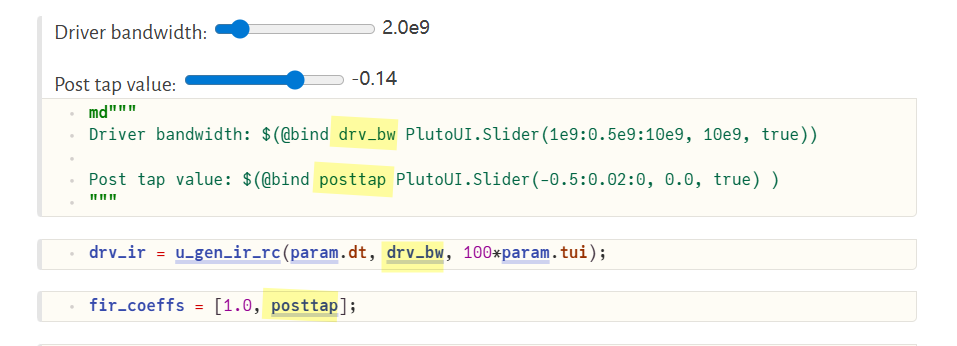
PlutoUI.Slider
multiple dispatch
A function can take arguments of different types, and share the same name
@. : used for automatic broadcasting
across an entire expression
1 | # Manual broadcasting |
Revise.jl Context Summary
| Context | Role | Key Mechanism |
|---|---|---|
| REPL | Hot-reloads functions and modules without restarting Julia. | using Revise then
using MyPackage |
| Scripts | Watches standalone .jl files
for changes on save. |
includet("path/to/script.jl") |
| Pluto.jl | Tracks updates to external packages used in the notebook. | using Revise in a cell
(Internal cells are natively reactive). |
| Jupyter/IJulia | Updates package code without needing to restart the kernel. | using Revise in the first
cell. |
| VS Code | Powers the integrated "Execute" and "Debugger" workflows. | Usually auto-enabled by the Julia Extension. |
Makie.jl & Observables.jl
Storopoli, Huijzer and Alonso (2021). Julia Data Science. [https://juliadatascience.github.io/JuliaDataScience/]
non-mutating methods of plotting function:
Figure Axis plot object in
collectionFigureAxisPlot
mutating methods of plotting function:
plot object
Figure + Axis + plot + axislegend
1 | fig = Figure() |
Observable
The argument to the Observable()
constructor provides both an initial
value and determines the type of the observable
variable.
There are two ways to access/update an observable's value - w/
.val or []
The difference is that only using [] will trigger the
listener event when updating the observable value
| Feature | lift |
on |
|---|---|---|
| Return Value | A new Observable | A Handler (for disconnecting later) |
| Purpose | To transform data (create a dependency) | To perform an action (side effect) |
| Data Flow | Value flows from parent to child | Value triggers an external event |
1 | using GLMakie |
DifferentialEquations.jl & Callback Functions

Python
np.fft.fft vs np.fft.rfft
1 | import numpy as np |
np.fft.irfft
Since the discrete Fourier Transform of real input is Hermitian-symmetric, the negative frequency terms are taken to be the complex conjugates of the corresponding positive frequency terms
scipy.signal.residue: (H(s) = ) Converts numerator/denominator arrays into residues, poles, and a direct polynomialscipy.signal.invres: (H(s) ) Converts residues, poles, and a direct polynomial back into numerator/denominator arrays
\[ H(s) = \frac{s + z}{(s + p_1)(s + p_2)} = \frac{z-p_1}{p_2-p_1}\frac{1}{s + p_1} + \frac{z-p_2}{p_1-p_2}\frac{1}{s + p_2}=\frac{r_1}{s+p_1} + \frac{r_2}{s+p_2} \]
1 | # https://github.com/capn-freako/PyBERT/blob/master/src/pybert/utility/sigproc.p |
np.where
There are actually two distinct call signatures:
| Call | Returns | Use |
|---|---|---|
np.where(cond, a, b) |
array, a/b chosen element-wise |
select values |
np.where(cond) |
tuple of index arrays where cond is
True |
find positions |
Matlab
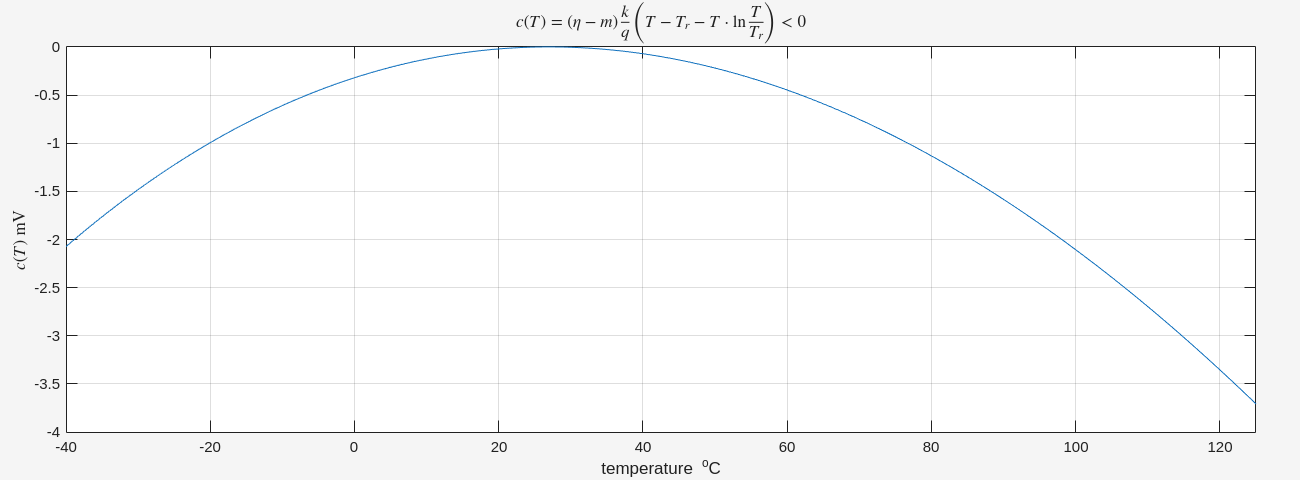
LaTeX code for the expression
1 | title('$c(T) = (\eta - m) \frac{k}{q} \left( T - T_r - T \cdot \ln \frac{T}{T_r} \right) < 0$', 'Interpreter', 'latex'); |
Dollar Signs ($): Wrapping the equation
in $...$ tells the LaTeX engine to use "inline math mode,"
which ensures proper spacing and formatting for symbols.
Interpreter: Adding
'Interpreter', 'latex' at the end is the "switch" that
tells MATLAB not to use its basic text engine.
identify class of an object or variable
1 | x = 42; |
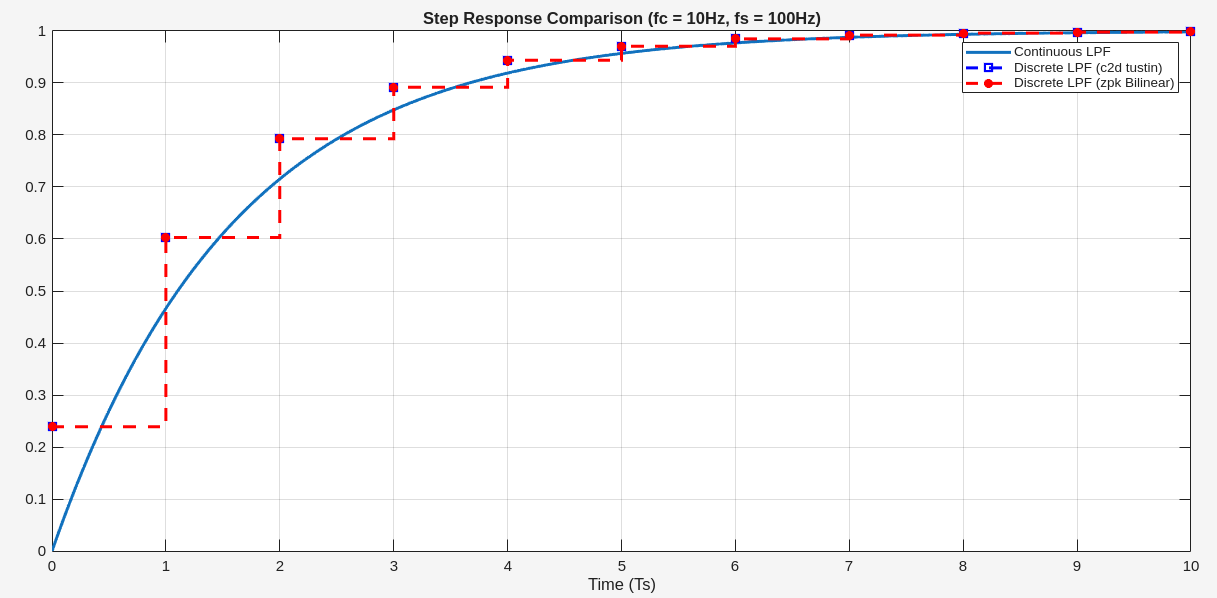
zpk
Use zpk to create zero-pole-gain models
sys = zpk(zeros,poles,gain) creates a
continuous-time zero-pole-gain model with zeros and
poles specified as vectors and the scalar value of gain.
sys = zpk(zeros,poles,gain,ts) creates a
discrete-time zero-pole-gain model with sample time ts.
Set ts to -1 or [] to leave the
sample time unspecified.
zpkdata
Access zero-pole-gain data
1 | [z,p,k] = zpkdata(sys,'v') |
the sampling time associated with that ZPK data
1 | Ts = sys_d.Ts; % Returns the sampling interval (1/fs) |
1 | % 1. Define Continuous ZPK Model |
symsandsymin MATLAB's Symbolic Math Toolbox both create symbolic objects, but they differ in usage and behavior.
syms: The command to create symbolic objects.
define symbolic scalar variables
1 | syms t x a b; |
define symbolic scalar functions that depend on the
variable t
1 | syms f(t) g(t) h(t) vc0(t) vc1(t) vc2(t); |
create a set of symbolic row vectors with
sym
1 | m=2500; |
3D surface plot, importing data from a CSV file
1 | clear; clc |
By using NaN, the surf command will simply
not render any polygons over the invalid coordinates. Your 3D plot will
sharply truncate exactly at the physical layout boundary rule line
(\(nsab = nsodab\))
[num_cell, den_cell] = tfdata(sys)returns cell arrays to accommodate Multi-Input Multi-Output (MIMO) systems
[num, den] = tfdata(sys, 'v')returns row vectors to accommodate Single-Input Single-Output (SISO) system
Using 'v' simplifies data handling for single systems by
eliminating the need to extract data from cells using curly braces
{}
1 | % Create a transfer function model |
Simulink
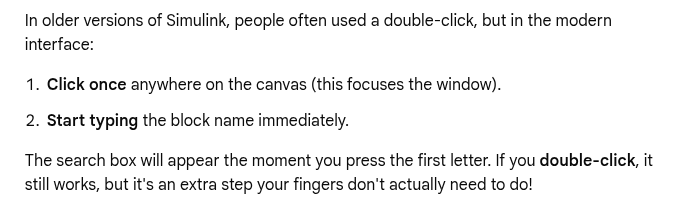
Quick Insert menu
- Single-click anywhere on the empty white space of your model canvas.
- Type the name of the block you want (e.g., "Gain", "Scope", or "Triggered Subsystem")
Configure Model Layout
Rotate Clockwise: Ctrl+R.
Rotate Counterclockwise:
Ctrl+Shift+R.
Flip Horizontally: Ctrl+I.
Flip Vertically: Right-click block () Rotate & Flip () Flip Block (or apply clockwise rotation twice)
Mathematica
/.: ReplaceAll command
WhenEvent[event,action]
Sequential Execution: If multiple actions are assigned to a
single event (e.g., WhenEvent[cond, {action1, action2}]),
they are evaluated in order.
DiscreteVariables in NDSolve: handle state
variables that only change at specific, discontinuous moments rather
than changing continuously with the independent variable (usually time
\(t\)), solution returned will be a
piecewise constant
Markdown
> [!NOTE]: General useful
information
[!NOTE]
> [!IMPORTANT]: Crucial information
for user success
[!IMPORTANT]
> [!WARNING]: Urgent information to
avoid potential problems
[!WARNING]
> [!TIP]: Helpful advice or better
ways to do things
[!TIP]
> [!CAUTION]: Negative consequences
or risks of certain actions
[!CAUTION]
subscript and superscript
HTML Tags (Universal Compatibility)
Subscript syntax:
text<sub>subscript</sub>Superscript syntax:
text<sup>superscript</sup>
H<sub>2</sub>O
H2O
X<sup>2</sup>
X2
- LaTeX Math Blocks
text color by embedding inline HTML tags
| Style Type | HTML Snippet Example |
|---|---|
| Color Name | <span style="color:blue">Blue Text</span>
Blue Text |
| Hex Code | <span style="color:#FF5733">Orange Text</span>
Orange Text |
| RGB Value | <span style="color:rgb(0, 128, 0)">Green Text</span>
Green Text |
| Background Color | <span style="background-color:yellow">Highlighted Text</span>
Highlighted Text |
| Combined | <span style="color:white; background-color:black">White text on black</span>
White text on
black |
Latex
In math mode, LaTeX provides several commands to insert horizontal space of specific widths:
| Command | Width | Name |
|---|---|---|
\, |
3/18 em | thin space |
\: |
4/18 em | medium space |
\; |
5/18 em | thick space |
\! |
−3/18 em | negative thin space |
\quad |
1 em | quad |
\qquad |
2 em | double quad |
\operatorname{...} — math operator in
an upright (roman) font with appropriate mathematical spacing \[
\operatorname{sinc}(x)
\]
\textcolor (Argument-Based)
- How it works: It takes exactly two arguments:
\textcolor{color}{content}. - Scope: It limits the color strictly to the content inside the second set of curly braces.
- Spacing: It automatically preserves proper mathematical spacing around the colored elements.
- Best for: Coloring individual variables, specific numbers, or small terms.
\color (Switch-Based)
- How it works: It acts as a toggle switch:
\color{color}. - Scope: It colors everything that
follows it until it hits the end of the current environment or a closing
curly brace
}. - Spacing: It can sometimes disrupt standard mathematical spacing if not enclosed in braces.
- Best for: Coloring large sections, full equations, or entire document blocks.
Using \textcolor (Precise Targeting): takes the content
as an argument
1 | \textcolor{red}{E} = \textcolor{blue}{mc^2} |
\[ \textcolor{red}{E} = \textcolor{blue}{mc^2} \]
Using \color (The "Bleeding" Switch): changes the color
of everything after it If you do not isolate it
1 | {\color{red}{E}} = \color{blue}mc^2 |
\[ {\color{red}{E}} = \color{blue}mc^2 \]
To make \color behave like \textcolor, you
must manually wrap the command and the target character inside a hidden
group using extra curly braces { ... }
Set-Builder Notation and Conditional Probability
1 | P(A \mid B) |
\[ P(A \mid B) \]
1 | \left\{ x \in \mathbb{R} \mid x > 0 \right\} |
\[ \left\{ x \in \mathbb{R} \mid x > 0 \right\} \]
evaluation bar
1 | \bigg\rvert_{…} |
\[ \frac{df}{dx}\bigg\rvert_{x=0} \]
1 | \left. \right| |
\[ \left. \frac{df}{dx}\right|_{x=0} \]
math alphabet commands
| Blackboard Bold | Roman/Upright | Bold face | Calligraphic/Script |
|---|---|---|---|
\mathbb |
\mathrm |
\mathbf |
\mathcal |
| \(\mathbb{F}\mathbb{L}\) | \(\mathrm{F}\mathrm{L}\) | \(\mathbf{F}\mathbf{L}\) | \(\mathcal{F}\mathcal{L}\) |
implication arrow
\implies produces \(\implies\) (displays a long arrow with
proper math spacing).
\Rightarrow produces \(\Rightarrow\) (displays a standard-length
double right arrow).
\longrightarrow produces \(\longrightarrow\) (displays a long single
right arrow)
mermaid
Mermaid is a JavaScript based diagramming and charting tool that takes Markdown-inspired text definitions and creates diagrams dynamically in the browser
graph TD;A-->B;A-->C;B-->D;C-->D;C++
Using g++ only
conditional.cpp
1 |
|
-DDEBUG args
1 | $ g++ -Wall -Wextra -Wconversion conditional.cpp -o conditional |
add_definitions in CMakeLists.txt
1 | cmake_minimum_required(VERSION 3.2) |
without debug
1 | $ cmake .. |
with debug
1 | $ cmake -DDEBUG=ON .. |
marimo
A reactive Python notebook
uv
An extremely fast Python package and project manager, written in Rust.
draw.io
rounded corners
"Abs. arc size" stands for Absolute Arc Size. It is a shape property that controls how rounded corners are calculated when you resize a shape.
- When disabled (Percentage-based, default): The corner radius scales dynamically with the size of the shape. If you make a small rectangle massive, the rounded corners will grow proportionally larger.
- When enabled (Absolute value): The corner radius stays fixed at an exact pixel value, regardless of how large or small you resize the shape. This ensures consistent corner styling across shapes of different dimensions