Julia

create a new project

1
$ julia

]

1
(@v1.12) pkg> generate MyNewProj

;

1
shell> cd MyNewProj/

]

1
(@v1.12) pkg> activate .

pkg> dev|develop: add a local package, which not initialized by git

load custom module:

1
2
3
include("path/to/MyModule.jl")

struct0 = MyModule.Mystruct()
1
2
3
4
include("path/to/MyModule.jl")
import .MyModule:Mystruct

struct0 = Mystruct()
1
2
3
4
include("path/to/MyModule.jl")
using .MyModule # !!! don't work in Pluto

struct0 = Mystruct()

activate a Julia environment and execute a file using the command line

1
julia --project=. your_script.jl

The --project=. argument tells Julia to look for a Project.toml and Manifest.toml file in the current directory (indicated by .)


Sharing Project Environments

instantiate command to download and install all packages and their dependencies listed in Project.toml (and Manifest.toml if present)

Feature / Command activate generate resolve instantiate
Primary Goal Switch to a specific project folder's context. Create a brand new project skeleton from scratch. Recalculate the dependency tree for the current Julia version. Download and install the specific versions listed in the Manifest.
Julia Version Role Does not check version; just points Julia to a directory. Creates a Project.toml compatible with the running Julia version. Crucial: Filters package versions based on the [compat] julia field. Uses the Julia version to ensure the Manifest is valid before downloading.
Manifest Impact None. None (a manifest is only created once you add packages). Rewrites the Manifest.toml to match the current Julia environment. Follows the existing Manifest.toml to recreate the environment.
Cross-Version Use Same command works across all Julia versions. Standard way to start a project regardless of Julia version. Used to "fix" a Manifest when moving a project to a newer/older Julia version. Used to "build" the project once resolve has created a valid Manifest.
Error Handling Rarely fails (unless the path doesn't exist). Fails if the directory name is invalid or already exists. Fails if no package versions support your running Julia version. Fails if the Manifest was built for a different Julia version (pre-1.11).

Basics

parentmodule: determine the package a function in Julia originates from

names: Get a vector of the public names of a Module, excluding deprecated names

undef: undef is a special marker used when constructing arrays (including vectors) to indicate that the elements of the array should not be initialized to any specific value.

collect: return an Array of all items in a collection or iterator, collect(2:5), collect('B':'D'), collect("HELLO")

!: a function naming convention to indicate that a function mutates its arguments in place, meaning the changes will be visible outside the function. When a function is designed to modify its arguments, it is good practice to append a ! (exclamation mark) to its name

eltype: To find the type of the elements that are iterated over in a collection

typeof: To determine the specific type of any given value

1
2
3
4
5
6
7
pizza_tuple = ("hawaiian", 'S', 10.5)
typeof(pizza_tuple) # Tuple{String, Char, Float64}
eltype(pizza_tuple) # Any

arr = [1,2,3]
typeof(arr) # Vector{Int64} (alias for Array{Int64, 1})
eltype(arr) # Int64

Any: It is used to construct a heterogeneous array that can hold elements of any type, like Any[1, "hello", 3.14]

^: Repeat a regex n times (s^n is same with repeat(s, n)); Exponentiation operator

parse: convert a text string to anything else. parse(Int, "42"), parse(Float64, "42")

String * : concatenate strings, "The " * engine *

String $: string interpolation, use $(variable) instead of $variable when there is no whitespace that can clearly distinguish the variable name from the surrounding text

vec: Reshape the array as a one-dimensional column vector


dictionary

1
pizza = Dict("name" => "hawaiian", "size" => 'S', "price" => 10.5)

A problem with using a dictionary is that it requires every value to be of the same type

1
typeof(pizza)	# Dict{String, Any}

symbols

It is denoted by : (colon), followed by the name of the symbol, built-in Julia type to represent identifiers


named tuples

1
pizza = (name = "hawaiian", size = 'S', price = 10.5)

A named tuple only allows you to use symbols as keys

All types of tuples are immutable, meaning you cannot change them

implicit naming from identifiers

1
2
3
x = 0
t = (; x) # t is (x = 0,)
u = (; t.x) # u is (x = 0,)

composite type (struct) & type annotation

:: is used to annotate variables and expressions with their type. x::T means variable x should have type T. It helps Julia figure out how many bytes are needed to hold all fields in a struct

1
2
3
4
5
struct Archer
name::String
health::Int
arrows::Int
end

closure


varargs

"varargs" (variable arguments) refers to the ability of a function to accept an arbitrary number of arguments. This is achieved using the splat operator (...) in the function definition.

1
2
3
4
5
6
7
function my_sum(a, b, rest...)
total = a + b
for x in rest
total += x
end
return total
end
1
my_sum(1, 2, 3, 4, 5)	# 15

keyword arguments

a semicolon (;) separates positional arguments from keyword arguments in the function signature. All arguments to the right of the semicolon are treated as keyword arguments. They can optionally have default values


views

A view is essentially a pointer to a sub-section of another vector, but not a standalone vector itself

1
2
3
4
5
6
7
8
9
10
11
12
13
one2ten = collect(1:10);
println(one2ten)

one2five = one2ten[1:5]
one2five_view = view(one2ten, 1:5)

one2ten[1] = 10
println(one2five)
println(one2five_view)

# [1, 2, 3, 4, 5, 6, 7, 8, 9, 10]
# [1, 2, 3, 4, 5]
# [10, 2, 3, 4, 5]

@views is a macro that converts sliced arrays into views (pointers are much cheaper than creating copies of arrays). For more information on how to use the view syntax correctly


semicolon after steprange

placing a semicolon ; after a step range expression inside square brackets, e.g., [1:10;], changes the resulting object from a UnitRange to a Vector

1
2
3
4
5
b = [1:2:10]	# Vector{StepRange{Int64, Int64}}
a = [1:2:10;] # Vector{Int64}

size(b) # (1)
size(a) # (5)

element-wise operations

Dot syntax for operators: For binary operators like +, -, *, /, ^

Dot syntax for functions: For functions, the dot is placed after the function name.


Property destructuring

1
2
3
4
5
6
7
8
julia> (; b, a) = (a=1, b=2, c=3)
(a = 1, b = 2, c = 3)

julia> a
1

julia> b
2

One-line functions

"one-line function" also known as the compact "assignment form"

1
function_name(parameters) = expression

Anonymous Functions (Lambda Functions)

functions without a name (parameters) -> expression, often defined inline for use with higher-order functions like map, filter, or reduce

1
2
numbers = [1, 2, 3]
doubled_numbers = map(x -> 2 * x, numbers) # doubled_numbers will be [2, 4, 6]

do keyword is syntactic sugar for creating an anonymous function and passing it as the first argument to another function

1
2
3
4
map([1, 2, 3]) do x
y = x * 2
return y + 1
end
  • do starts the block.
  • x, y (optional) following do are the arguments the anonymous function receives.
  • end closes the block

CircularBuffer

Feature Vector (Standard) CircularBuffer (DataStructures.jl)
Push/Pop Front \(O(n)\) (Shifts all elements) \(O(1)\) (Updates head pointer)
Push/Pop Back \(O(1)\) (Amortized) \(O(1)\)
Random Access \(O(1)\) (Direct) \(O(1)\) (With index wrapping logic)
Capacity Dynamic: Grows as needed Fixed: Initialized at set size
Overflow Reallocates memory Overwrites the oldest data
Memory Layout Contiguous Contiguous (internally wraps)
Best Use Case General collections / Appending Sliding windows / Real-time buffers
1
2
3
4
5
6
7
8
9
10
11
12
using DataStructures

# Initialize a CircularBuffer of type Int with capacity 3
cb = CircularBuffer{Int}(3)

# Add elements
push!(cb, 1) # [1]
push!(cb, 2) # [1, 2]
append!(cb, [3, 4]) # [2, 3, 4] (1 is overwritten because capacity is 3)

# Add to the front
pushfirst!(cb, 0) # [0, 2, 3] (4 is overwritten)
  • push!(cb, item): Adds a single item to the back of the buffer. If the buffer is at its capacity, the item at the front (the oldest) is removed to make room.
  • append!(cb, collection): Adds multiple items from another collection to the back of the buffer. This is essentially a shorthand for calling push! on each element of the collection.
Feature push! append!
Input A single item A collection of items
Action Adds one element as a single entry Unpacks all elements from the input

using vs import

that’s the difference between using and import - the former brings all exported names into scope, while the latter only brings NiceStuff (the module identifier) into scope.

[https://discourse.julialang.org/t/difference-between-include-use-and-import/65918/5]


PlutoUI.Slider
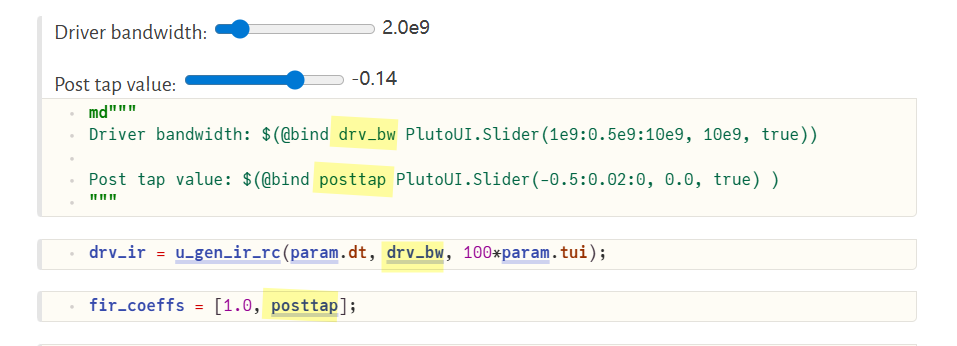
image-20260118010932797


multiple dispatch

A function can take arguments of different types, and share the same name


@. : used for automatic broadcasting across an entire expression

1
2
3
4
5
6
# Manual broadcasting
y = exp.(sin.(x)) .+ 2 .* x


# Automatic broadcasting
@. y = exp(sin(x)) + 2 * x

Revise.jl Context Summary

Context Role Key Mechanism
REPL Hot-reloads functions and modules without restarting Julia. using Revise then using MyPackage
Scripts Watches standalone .jl files for changes on save. includet("path/to/script.jl")
Pluto.jl Tracks updates to external packages used in the notebook. using Revise in a cell (Internal cells are natively reactive).
Jupyter/IJulia Updates package code without needing to restart the kernel. using Revise in the first cell.
VS Code Powers the integrated "Execute" and "Debugger" workflows. Usually auto-enabled by the Julia Extension.

Makie.jl & Observables.jl

Storopoli, Huijzer and Alonso (2021). Julia Data Science. [https://juliadatascience.github.io/JuliaDataScience/]

non-mutating methods of plotting function: Figure Axis plot object in collectionFigureAxisPlot

mutating methods of plotting function: plot object

Figure + Axis + plot + axislegend

1
2
3
4
5
fig = Figure()
ax = Axis(fig[1,1])
scatterlines!(ax, 0.5:0.2:3pi, x -> -cos(x)/x, label = "cos(x)/x")
axislegend(; position=:rt) # plot function's label rather xlabel, ylabel of Axis
fig

Observable

The argument to the Observable() constructor provides both an initial value and determines the type of the observable variable.

There are two ways to access/update an observable's value - w/ .val or []

The difference is that only using [] will trigger the listener event when updating the observable value

Feature lift on
Return Value A new Observable A Handler (for disconnecting later)
Purpose To transform data (create a dependency) To perform an action (side effect)
Data Flow Value flows from parent to child Value triggers an external event
1
2
3
4
5
6
7
8
9
using GLMakie

x = Observable(0.0)

on(x) do x
println("New value of x is $x")
end

x[] = 5.0

DifferentialEquations.jl & Callback Functions

image-20260510174019169

Python

np.fft.fft vs np.fft.rfft

1
2
3
4
5
6
7
8
9
10
11
12
13
14
15
16
17
18
19
20
21
22
23
24
import numpy as np

def custom_rfft(x):
# Ensure input is a NumPy array
x = np.asarray(x)

# 1. Compute the full standard FFT
full_fft = np.fft.fft(x)

# 2. Calculate the required output length: (n // 2) + 1
n = len(x)
rfft_len = (n // 2) + 1

# 3. Slice and return only the unique positive frequencies
return full_fft[:rfft_len]


# Test data
even_signal = [1.0, 2.0, 3.0, 4.0]
odd_signal = [1.0, 2.0, 3.0, 4.0, 5.0]

# Verification
print(np.allclose(custom_rfft(even_signal), np.fft.rfft(even_signal))) # True
print(np.allclose(custom_rfft(odd_signal), np.fft.rfft(odd_signal))) # True

np.fft.irfft

Since the discrete Fourier Transform of real input is Hermitian-symmetric, the negative frequency terms are taken to be the complex conjugates of the corresponding positive frequency terms


  • scipy.signal.residue: (H(s) = ) Converts numerator/denominator arrays into residues, poles, and a direct polynomial
  • scipy.signal.invres: (H(s) ) Converts residues, poles, and a direct polynomial back into numerator/denominator arrays

\[ H(s) = \frac{s + z}{(s + p_1)(s + p_2)} = \frac{z-p_1}{p_2-p_1}\frac{1}{s + p_1} + \frac{z-p_2}{p_1-p_2}\frac{1}{s + p_2}=\frac{r_1}{s+p_1} + \frac{r_2}{s+p_2} \]

1
2
3
4
5
6
7
8
9
10
11
12
13
14
15
16
17
18
19
20
21
22
23
24
25
26
27
28
29
30
31
32
33
34
# https://github.com/capn-freako/PyBERT/blob/master/src/pybert/utility/sigproc.p


def make_ctle(rx_bw: float, peak_freq: float, peak_mag: float, w: Rvec) -> tuple[Rvec, Cvec]: # pylint: disable=too-many-arguments # noqa: F405
"""
Generate the frequency response of a continuous time linear equalizer (CTLE), given the:

- signal path bandwidth,
- peaking specification, and
- list of frequencies of interest.

Args:
rx_bw: The natural (or, unequalized) signal path bandwidth (Hz).
peak_freq: The location of the desired peak in the frequency response (Hz).
peak_mag: The desired relative magnitude of the peak (dB).
w: The list of frequencies of interest (rads./s).

- The zero location is chosen, so as to provide the desired degree of peaking.
"""

p2 = -2.0 * pi * rx_bw
p1 = -2.0 * pi * peak_freq
z = p1 / pow(10.0, peak_mag / 20.0)
if p2 != p1:
r1 = (z - p1) / (p2 - p1)
r2 = 1 - r1
else:
r1 = -1.0
r2 = z - p1
b, a = invres([r1, r2], [p1, p2], [])
w, H = freqs(b, a, w)
H /= max(abs(H))

return (w, H)

np.where

There are actually two distinct call signatures:

Call Returns Use
np.where(cond, a, b) array, a/b chosen element-wise select values
np.where(cond) tuple of index arrays where cond is True find positions

Matlab

LaTeX code for the expression

1
2
3
title('$c(T) = (\eta - m) \frac{k}{q} \left( T - T_r - T \cdot \ln \frac{T}{T_r} \right) < 0$', 'Interpreter', 'latex');

ylabel('$c(T)$ mV', 'Interpreter', 'latex');

Dollar Signs ($): Wrapping the equation in $...$ tells the LaTeX engine to use "inline math mode," which ensures proper spacing and formatting for symbols.

Interpreter: Adding 'Interpreter', 'latex' at the end is the "switch" that tells MATLAB not to use its basic text engine.
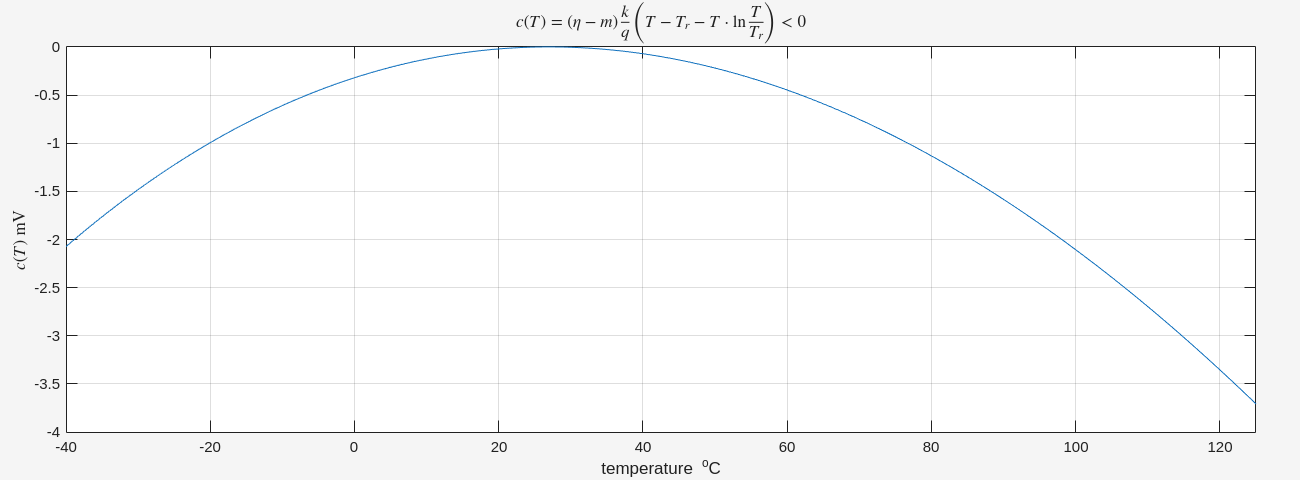
image-20260502005228622


identify class of an object or variable

1
2
3
x = 42;
type_name = class(x); % Returns 'double'
disp(type_name)


zpk

Use zpk to create zero-pole-gain models

sys = zpk(zeros,poles,gain) creates a continuous-time zero-pole-gain model with zeros and poles specified as vectors and the scalar value of gain.

sys = zpk(zeros,poles,gain,ts) creates a discrete-time zero-pole-gain model with sample time ts. Set ts to -1 or [] to leave the sample time unspecified.


zpkdata

Access zero-pole-gain data

1
[z,p,k] = zpkdata(sys,'v')

the sampling time associated with that ZPK data

1
Ts = sys_d.Ts; % Returns the sampling interval (1/fs)
1
2
3
4
5
6
7
8
9
10
11
12
13
14
15
16
17
18
19
20
21
22
23
24
25
26
27
28
29
30
31
32
33
34
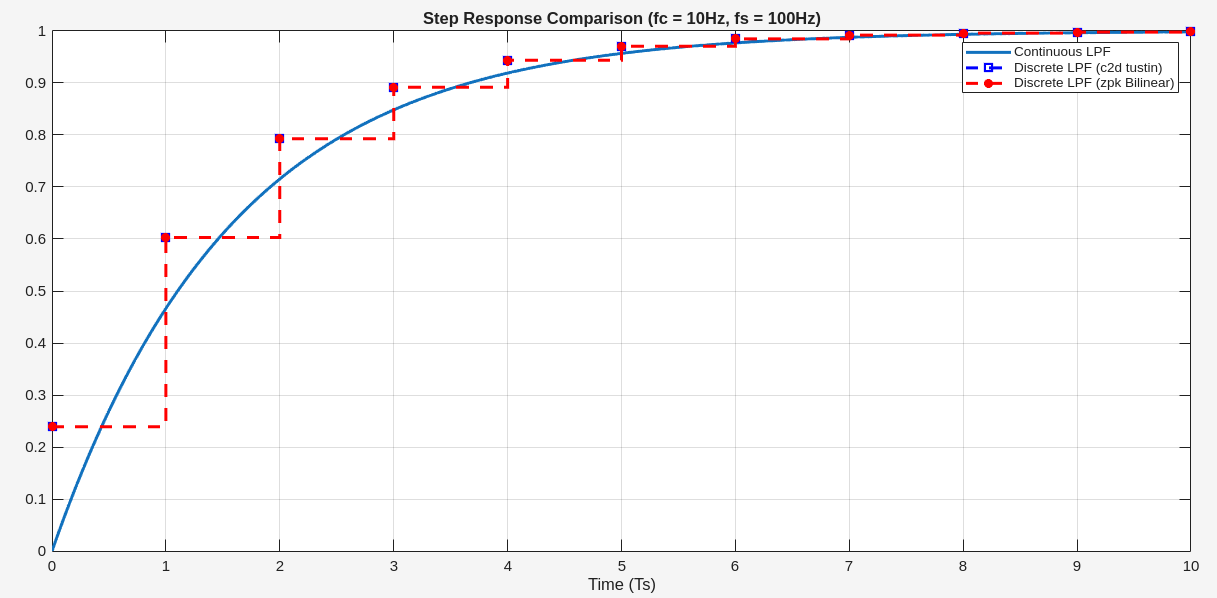
% 1. Define Continuous ZPK Model
fc = 10; % Cutoff frequency in Hz
wc = 2 * pi * fc; % Cutoff frequency in rad/s

z = []; % No zeros
p = -wc; % Single pole at -wc
k = wc; % Gain (to ensure DC gain = 1)

sys_c = zpk(z, p, k);

% 2. Convert to Discrete via Bilinear Transformation
fs = 100; % Sampling frequency in Hz
dt = 1/fs;

% 'tustin' flag is the standard name for the bilinear transformation in control theory
sys_d = c2d(sys_c, dt, 'tustin'); % 'tustin' is the Bilinear method in MATLAB

% Extract zeros, poles, and gain from sys_c
[zc, pc, kc] = zpkdata(sys_c, 'v');
[zd, pd, kd] = bilinear(zc, pc, kc, fs);
sys_dbli = zpk(zd, pd, kd, dt);


% 3. Plot and Compare Step Response
[yc, tc] = step(sys_c, 0:dt/100:dt*10);
tt = 0:dt:dt*10;
[yd, ~] = step(sys_d, tt);
[ydbli, ~] = step(sys_dbli, tt);

plot(tc/dt, yc, LineWidth=2); hold on
stairs(tt/dt, yd, 'bs--', LineWidth=2); stairs(tt/dt, ydbli, 'r*--', LineWidth=2)
title(['Step Response Comparison (fc = ', num2str(fc), 'Hz, fs = ', num2str(fs), 'Hz)']);
legend('Continuous LPF', 'Discrete LPF (c2d tustin)', 'Discrete LPF (zpk Bilinear)');
grid on; xlabel('Time (Ts)')

image-20260503212334349


syms and sym in MATLAB's Symbolic Math Toolbox both create symbolic objects, but they differ in usage and behavior.

syms: The command to create symbolic objects.

define symbolic scalar variables

1
syms t x a b;

define symbolic scalar functions that depend on the variable t

1
syms f(t) g(t) h(t) vc0(t) vc1(t) vc2(t);

create a set of symbolic row vectors with sym

1
2
m=2500;
ic=zeros(1,m);


3D surface plot, importing data from a CSV file

1
2
3
4
5
6
7
8
9
10
11
12
13
14
15
16
17
18
19
20
21
22
clear; clc
df = readmatrix('/path/to/core_lod_sodab_sab.csv');
nsab = df(:, 3);
nsodab = df(:,4);

svtN = df(:,8)*1e3; % mV
lvtN = df(:,9)*1e3;
ulvtN = df(:,10)*1e3;
elvtN = df(:,11)*1e3;

vth_plot = svtN;

% Uses logical indexing to find rows where nsab is greater than nsodab.
% set to NaN to filter them out completely
vth_plot(nsab>nsodab) = NaN;

[nsabq, nsodabq] = meshgrid(linspace(min(nsab), max(nsab), 20), linspace(min(nsodab), max(nsodab), 20));

vth_plotq = griddata(nsab, nsodab, vth_plot, nsabq, nsodabq);

surf(nsabq, nsodabq, vth_plotq);
xlabel('CPODE(SA/SB)'); ylabel('PODE(SODA/SODB)'); title('svtN (mV)'); view(135,30)

By using NaN, the surf command will simply not render any polygons over the invalid coordinates. Your 3D plot will sharply truncate exactly at the physical layout boundary rule line (\(nsab = nsodab\))


  • [num_cell, den_cell] = tfdata(sys)

    returns cell arrays to accommodate Multi-Input Multi-Output (MIMO) systems

  • [num, den] = tfdata(sys, 'v')

    returns row vectors to accommodate Single-Input Single-Output (SISO) system

Using 'v' simplifies data handling for single systems by eliminating the need to extract data from cells using curly braces {}

1
2
3
4
5
6
7
8
9
10
11
12
13
14
% Create a transfer function model
s = tf('s');
sys = (s + 2) / (s^2 + 3*s + 2);

% Default output (returns cell arrays)
[num_cell, den_cell] = tfdata(sys);
% num_cell 1×1 cell array is {[0 1 2]}, num_cell{1} is [0 1 2]
% den_cell 1×1 cell array is {[1 3 2]}, den_cell{1} is [1 3 2]


% Using the 'v' option (returns numerical row vectors)
[num, den] = tfdata(sys, 'v');
% num is [0 1 2]
% den is [1 3 2]

Quick Insert menu

  • Single-click anywhere on the empty white space of your model canvas.
  • Type the name of the block you want (e.g., "Gain", "Scope", or "Triggered Subsystem")
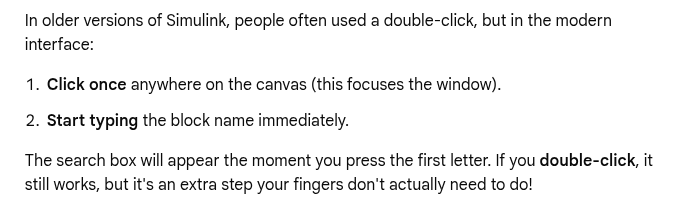
image-20260505170224276


Configure Model Layout

Rotate Clockwise: Ctrl+R.

Rotate Counterclockwise: Ctrl+Shift+R.

Flip Horizontally: Ctrl+I.

Flip Vertically: Right-click block () Rotate & Flip () Flip Block (or apply clockwise rotation twice)

Mathematica

/.: ReplaceAll command


WhenEvent[event,action]

Sequential Execution: If multiple actions are assigned to a single event (e.g., WhenEvent[cond, {action1, action2}]), they are evaluated in order.


DiscreteVariables in NDSolve: handle state variables that only change at specific, discontinuous moments rather than changing continuously with the independent variable (usually time \(t\)), solution returned will be a piecewise constant

Markdown

> [!NOTE]: General useful information

[!NOTE]

> [!IMPORTANT]: Crucial information for user success

[!IMPORTANT]

> [!WARNING]: Urgent information to avoid potential problems

[!WARNING]

> [!TIP]: Helpful advice or better ways to do things

[!TIP]

> [!CAUTION]: Negative consequences or risks of certain actions

[!CAUTION]


subscript and superscript

  1. HTML Tags (Universal Compatibility)

    Subscript syntax: text<sub>subscript</sub>

    Superscript syntax: text<sup>superscript</sup>

H<sub>2</sub>O

H2O

X<sup>2</sup>

X2

  1. LaTeX Math Blocks

text color by embedding inline HTML tags

Style Type HTML Snippet Example
Color Name <span style="color:blue">Blue Text</span> Blue Text
Hex Code <span style="color:#FF5733">Orange Text</span> Orange Text
RGB Value <span style="color:rgb(0, 128, 0)">Green Text</span> Green Text
Background Color <span style="background-color:yellow">Highlighted Text</span> Highlighted Text
Combined <span style="color:white; background-color:black">White text on black</span> White text on black

Latex

In math mode, LaTeX provides several commands to insert horizontal space of specific widths:

Command Width Name
\, 3/18 em thin space
\: 4/18 em medium space
\; 5/18 em thick space
\! −3/18 em negative thin space
\quad 1 em quad
\qquad 2 em double quad


\operatorname{...} — math operator in an upright (roman) font with appropriate mathematical spacing \[ \operatorname{sinc}(x) \]


\textcolor (Argument-Based)

  • How it works: It takes exactly two arguments: \textcolor{color}{content}.
  • Scope: It limits the color strictly to the content inside the second set of curly braces.
  • Spacing: It automatically preserves proper mathematical spacing around the colored elements.
  • Best for: Coloring individual variables, specific numbers, or small terms.

\color (Switch-Based)

  • How it works: It acts as a toggle switch: \color{color}.
  • Scope: It colors everything that follows it until it hits the end of the current environment or a closing curly brace }.
  • Spacing: It can sometimes disrupt standard mathematical spacing if not enclosed in braces.
  • Best for: Coloring large sections, full equations, or entire document blocks.

Using \textcolor (Precise Targeting): takes the content as an argument

1
\textcolor{red}{E} = \textcolor{blue}{mc^2}

\[ \textcolor{red}{E} = \textcolor{blue}{mc^2} \]

Using \color (The "Bleeding" Switch): changes the color of everything after it If you do not isolate it

1
{\color{red}{E}} = \color{blue}mc^2

\[ {\color{red}{E}} = \color{blue}mc^2 \]

To make \color behave like \textcolor, you must manually wrap the command and the target character inside a hidden group using extra curly braces { ... }


Set-Builder Notation and Conditional Probability

1
P(A \mid B)

\[ P(A \mid B) \]

1
\left\{ x \in \mathbb{R} \mid x > 0 \right\}

\[ \left\{ x \in \mathbb{R} \mid x > 0 \right\} \]


evaluation bar

1
\bigg\rvert_{…}

\[ \frac{df}{dx}\bigg\rvert_{x=0} \]

1
\left. \right|

\[ \left. \frac{df}{dx}\right|_{x=0} \]


math alphabet commands

Blackboard Bold Roman/Upright Bold face Calligraphic/Script
\mathbb \mathrm \mathbf \mathcal
\(\mathbb{F}\mathbb{L}\) \(\mathrm{F}\mathrm{L}\) \(\mathbf{F}\mathbf{L}\) \(\mathcal{F}\mathcal{L}\)


implication arrow

\implies produces \(\implies\) (displays a long arrow with proper math spacing).

\Rightarrow produces \(\Rightarrow\) (displays a standard-length double right arrow).

\longrightarrow produces \(\longrightarrow\) (displays a long single right arrow)

mermaid

Mermaid is a JavaScript based diagramming and charting tool that takes Markdown-inspired text definitions and creates diagrams dynamically in the browser

graph TD;A-->B;A-->C;B-->D;C-->D;

C++

Using g++ only

conditional.cpp

1
2
3
4
5
6
7
8
9
10
11
12
13
14
15
16
17
18
19
#include <iostream>

#define na 4

int main() {
int a[na];

a[0] = 2;
for (int n = 1; n < na; n++) a[n] = a[n-1] + 1;

#ifdef DEBUG
// Only kept by preprocessor if DEBUG defined
for (int n = 0; n < na; n++) {
std::cout << "a[" << n << "] = " << a[n] << std::endl;
}
#endif

return 0;
}

-DDEBUG args

1
2
3
4
5
6
7
8
$ g++ -Wall -Wextra -Wconversion conditional.cpp -o conditional
$ ./conditional
$ g++ -Wall -Wextra -Wconversion conditional.cpp -o conditional -DDEBUG
$ ./conditional
a[0] = 2
a[1] = 3
a[2] = 4
a[3] = 5


add_definitions in CMakeLists.txt

1
2
3
4
5
6
7
8
9
cmake_minimum_required(VERSION 3.2)

option(DEBUG "Option description" OFF)

if(DEBUG)
add_definitions(-DDEBUG)
endif(DEBUG)

add_executable(cond conditional.cpp)

without debug

1
2
3
$ cmake ..
$ make
$ ./cond

with debug

1
2
3
4
5
6
7
$ cmake -DDEBUG=ON ..
$ make
$ ./cond
a[0] = 2
a[1] = 3
a[2] = 4
a[3] = 5

marimo

A reactive Python notebook

uv

An extremely fast Python package and project manager, written in Rust.

draw.io

rounded corners

"Abs. arc size" stands for Absolute Arc Size. It is a shape property that controls how rounded corners are calculated when you resize a shape.

  • When disabled (Percentage-based, default): The corner radius scales dynamically with the size of the shape. If you make a small rectangle massive, the rounded corners will grow proportionally larger.
  • When enabled (Absolute value): The corner radius stays fixed at an exact pixel value, regardless of how large or small you resize the shape. This ensures consistent corner styling across shapes of different dimensions

create & assign bump

power/ground bump

1
2
3
4
5
6
7
create_bump –cell PAD90UBMBOP –loc_type cell_center –loc $x0 $y  
create_bump –cell PAD90UBMBOP –loc_type cell_center –loc $x1 $y
...
create_bump –cell PAD90UBMBOP –loc_type cell_center –loc $xn $y
deselectAll
select_bump –bum_cell PAD90UBMBOP
assignPGBumps –nets {vss vdd_dig} -selected –checkboard

pma_dig_bumps.drawio

signal or power/ground bump

1
2
3
4
5
set bump_name [create_bump –cell PAD150PITCH –loc $bump_x $bump_y –loc_type cell_center –return_bumps_name] 
# assign power/ground bump
assignPGBumps –bumps $bump_name –nets $pin_name
# or assign to signal bump
assignSigToBump –bumps $bump_name –net $pin_name

Path Based Analysis

aocv : Re-timing the timing critical paths using the LOCV deratingfactors

path_slew_propagation : Re-timing the timing critical paths using the actual slews for thepath

aocv_path_slew_propagation : Combination of re-timing with aocv + path_slew_propagation

waveform_propagation : Re-timing with waveform effect taken into consideration during delayCal

Fix DRC Violation

1
2
3
4
5
6
7
8
9
10
11
12
13
14
15
clearDrc
set drc_marker_file calibre_drc_markers.err
loadViolationReport -type Calibre -filename $drc_marker_file


foreach marker_id [dbGet -p -e top.markers.userOriginator Calibre] {


editSelect -area [dbget $object.box] -layer M4

dbSet [dbGet -p top.nets.name $net ].wires.status routed

editTrim -selected

check mode variants

1
2
3
4
5
6
7
8
9
10
11
12
13
14
15
16
17
18
19
20
21
checkDesign

check_timing

checkPlace


setDesignMode

setFPlanMode

setEcoMode

setPlaceMode

setRouteMode

setExtractRCMode

setOptMode

Common Commands

Analysis Command

Clock Concurrent Optimization Technology (CCOpt)

Database Navigation

Data Exchange

Global Skew and Local Skew

Technology File

timeDesign vs. report_timing

Parasitic Extraction

Floorplan

/2022/02/07/Innovus/Tempus Nonfunctional ECO

Innovus ECO

block level create Power Ground Pin method

1
2
3
4
editStretch x ...
selectWire ... VDD
selectWire ... GND
createPGPin -selected -onDie

createPGPin_onDie.drawio

Add endcap and tapcell

First place place hard macro and add placement halo, then execute the following code to add endcap and tapcell.

1
2
3
4
5
6
7
8
9
10
11
12
13
14
15
16
17
18
19
20
21
22
deleteFill -prefix ENDCAP
deleteFill -prefix WELL

setEndCapMode \
-leftEdge BOUNDARY_RIGHTBWP16P90CPD \
-rightEdge BOUNDARY_LEFTBWP16P90CPD \
-leftBottomCorner BOUNDARY_NCORNERBWP16P90CPD \
-leftTopCorner BOUNDARY_PCORNERBWP16P90CPD \
-rightTopEdge FILL3BWP16P90CPD \
-rightBottomEdge FILL3BWP16P90CPD \
-topEdge "BOUNDARY_PROW2BWP16P90CPD BOUNDARY_PROW3BWP16P90CPD"
-bottomEdge "BOUNDARY_NROW2BWP16P90CPD BOUNDARY_NROW3BWP16P90CPD" \
-boundary_tap true

set_well_tap_mode \
-rule 33
-bottom_tap_cell BOUNDARY_NTAPBWP16P90CPD \
-top_tap_cell BOUNDARY_PTAPBWP16P90CPD \
-cell TAPCELLBWP16P90CPD

addEndCap
addWellTap -checkerBoard -cell TAPCELLBWP16P90CPD -cellInterval 160

endcap_tapcell_floorplan.drawio

First place place hard macro and add placement halo, then execute the following code to add endcap and tapcell.

1
2
3
4
5
6
7
8
9
10
11
12
13
14
15
16
17
18
19
20
21
22
deleteFill -prefix ENDCAP
deleteFill -prefix WELL

setEndCapMode \
-leftEdge BOUNDARY_RIGHTBWP16P90CPD \
-rightEdge BOUNDARY_LEFTBWP16P90CPD \
-leftBottomCorner BOUNDARY_NCORNERBWP16P90CPD \
-leftTopCorner BOUNDARY_PCORNERBWP16P90CPD \
-rightTopEdge FILL3BWP16P90CPD \
-rightBottomEdge FILL3BWP16P90CPD \
-topEdge "BOUNDARY_PROW2BWP16P90CPD BOUNDARY_PROW3BWP16P90CPD"
-bottomEdge "BOUNDARY_NROW2BWP16P90CPD BOUNDARY_NROW3BWP16P90CPD" \
-boundary_tap true

set_well_tap_mode \
-rule 33
-bottom_tap_cell BOUNDARY_NTAPBWP16P90CPD \
-top_tap_cell BOUNDARY_PTAPBWP16P90CPD \
-cell TAPCELLBWP16P90CPD

addEndCap
addWellTap -checkerBoard -cell TAPCELLBWP16P90CPD -cellInterval 160

[https://github.com/StanfordAHA/PowerDomainDesign/blob/c280a35f01ad0617ff054b925c1d5c2652a0f4e1/scripts/layout_pe_tile_new.power.tcl#L94-L113]

In-design Sign-off Metal Fill Flow

Before inserting sign-off metal fill, stream out a GDSII stream file of the current database. Specify the mapping file and units that match with the rule deck you specify while inserting metal fill. If necessary, include the detailed-cell (-merge option) Graphic Database System (GDS).

PVS:

1
2
streamOut -merge $GDSFile -mode ALL -units $GDSUNITS -mapFile $GDSMAP -outputMacros pvs.fill.gds
run_pvs_metal_fill -ruleFile $DUMMYRULE -defMapFile $DEFMAP -gdsFile pvs.fill.gds -cell [dbgDesignName]

Pegasus:

1
2
streamOut -merge $GDSFile -mode ALL -units $GDSUNITS -mapFile $GDSMAP -outputMacros pegasus.fill.gds
run_pegasus_metal_fill -ruleFile $DUMMYRULE -defMapFile $DEFMAP -gdsFile pegasus.fill.gds -cell [dbgDesignName]

Just replace run_pvs_metal_fill with run_pegasus_metal_fill

Note: Innovus metal fill (e.g. addMetalFill, addViaFill, etc.) does not support 20nm and below node design rules. We strongly recommend the Pegasus/PVS metal fill solution for 20nm and below. If you have sign-off metal fill rule deck for 28nm and above available, we recommend you to move to Pegasus/PVS solution too.

  1. trimMetalFillNearNet does not check DRC rules. It only removes the metal fill with specified spacing

  2. Do not perform ECO operations after dump in sign-off metal fill (by run_pvs_metal_fill or run_pegasus_metal_fill), especially, at 20nm and below nodes.

  3. If you perform an ECO action, the tool cannot get DRC clean because trimMetalFill does not support 20nm and below node design rules.

  4. The sign-off metal fill typically does not cause DRC issues with regular wires.

The run_pvs_metal_fill command does the following:

  • Runs PVS with the fill rules to create a GDSII output file.
  • Converts the GDSII to a DEF format file based on the GDSII to DEF layermap provided.
  • Loads the resulting DEF file into Innovus.

Pegasus is similar to PVS, shown as below,

The run_pegasus_metal_fill command does the following:

  • Runs Pegasus with the fill rules to create a GDSII output file.
  • Converts the GDSII to a DEF format file based on the GDSII to DEF layermap provided.
  • Loads the resulting DEF file into Innovus.

Reference:

Innovus User Guide, Product Version 21.12, Last Updated in November 2021

How does EDI System identify spare cells in a post-mask ECO flow?

How does EDI System identify spare cells in a post-mask ECO flow?

Spare cells should have a unique string in their instance name to identify them. Then the command specifySpareGate or ecoDesign -useSpareCells patternName is run to identify the spare instances. For example, if all spare cells have _spare_ in their name then they are identified using:

1
specifySpareGate -inst *_spare_*

OR

1
ecoDesign -spareCells *_spare_* ...

Note: if you are making manual ECO changes to a netlist and converting a spare cell to a logical instance, it's important to change the instance name. Otherwise, the instance may be identified as a spare cell if a future ECO is performed because it still has the spare cell instance name.

Example

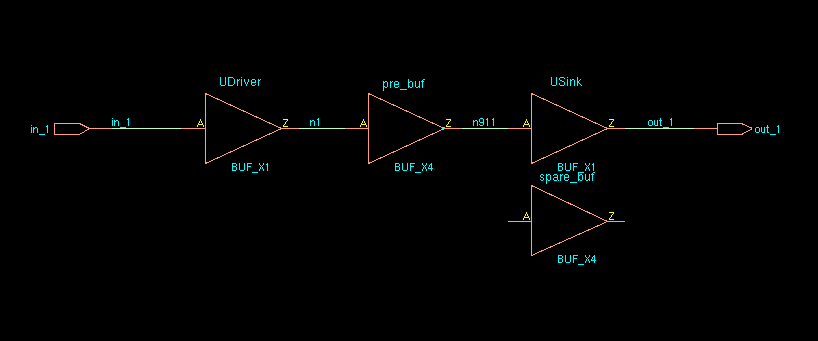
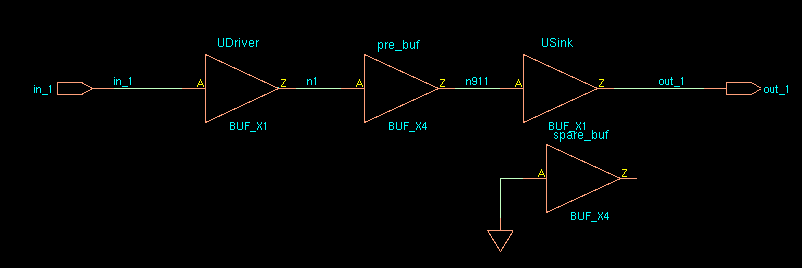
The cell to be swapped is unplaced

image-20220307002842020

pre_buf: unplaced

spare_buf: placed

innovus 49> dbGet top.insts.name

spare_buf pre_buf UDriver USink

innovus 50> dbGet top.insts.

0x7f7b03ef60e0 0x7f7b03ef6150 0x7f7b03ef6000 0x7f7b03ef6070

1
2
specifySpareGate -inst spare_*
ecoSwapSpareCell pre_buf spare_buf

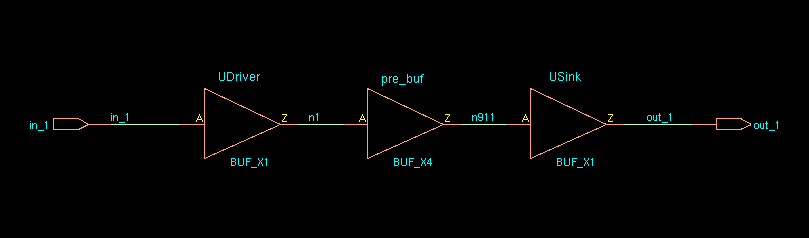
image-20220307003059068

innovus 55> dbGet top.insts.name

pre_buf UDriver USink

innovus 56> dbGet top.insts.

0x7f7b03ef6150 0x7f7b03ef6000 0x7f7b03ef6070

innovus 57> dbGet top.insts.Pstatus

placed fixed fixed

Note: sparecell's pointer and name is swapped with the unplaced cell.

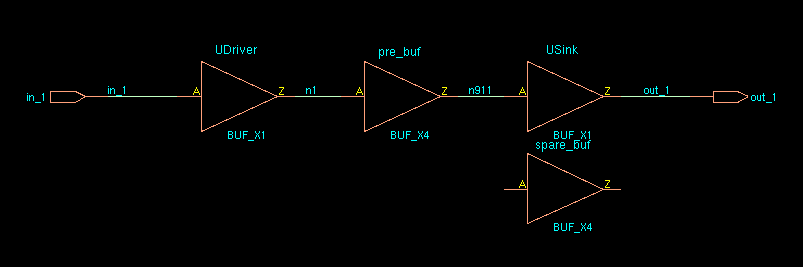
The cell to be swapped is placed

image-20220307004654614

innovus 62> dbGet top.insts.name

spare_buf pre_buf UDriver USink

innovus 63> dbGet top.insts.

0x7f7b03ef60e0 0x7f7b03ef6150 0x7f7b03ef6000 0x7f7b03ef6070

innovus 64> dbGet top.insts.pStatus

placed placed fixed fixed

1
2
3
4
innovus 66> specifySpareGate -inst spare_*
Specifying instance [spare_buf] as spare gate.
Specified 1 instances as spare gate.
innovus 67> ecoSwapSpareCell pre_buf spare_buf

image-20220307005254488

innovus 68> dbGet top.insts.name

spare_buf pre_buf UDriver USink

innovus 69> dbGet top.insts.

0x7f7b03ef60e0 0x7f7b03ef6150 0x7f7b03ef6000 0x7f7b03ef6070

innovus 70> dbGet top.insts.pStatus

placed placed fixed fixed

Note: sparecell's pointer and name is swapped with the placed cell.

Error in "Innovus Text Command Reference 21.12"

ecoSwapSpareCell

If the cell to be swapped is unplaced, it is mapped to the spare cell. *instName* is deleted, and its connection is transferred to the spare cell. If the cell to be swapped is placed, it is swapped with the spare cell and is renamed to *instNameSuffix* if the -suffix option is used. If a suffix is not specified, the *instName* cell is renamed to *spareCellInstName*. The *instName* cell's connections are transferred to *spareCellInstName*. The input of *instName* is tielo, based on the global connection definition.

reference

Answers to Top 10 Questions on Performing ECOs in EDI System

EE 582: Physical Design Automation of VLSI Circuits and Systems

Copy a Visio drawing

Copy a Visio drawing to Word, PowerPoint, or Excel [https://support.microsoft.com/en-us/office/copy-a-visio-drawing-to-word-powerpoint-or-excel-e301fef0-27cf-4540-9f91-901a824074ee]

  1. In Visio, open the file you want to appear in the Word document.

  2. Make sure nothing is selected, and then, on the Home tab, select Copy or press Ctrl+C

  3. paste

In Word, select where you want the Visio drawing to appear and then select Paste or press Ctrl+V

In PowerPoint or Excel, On the Home tab, select Paste > Paste Special, and then select Microsoft Visio Drawing Object

LSF (Platform Load Sharing Facility)

bjobs: Displaying Job Status

bkill: cancels pending batch jobs and sends signals to running jobs

bhosts: displays hosts and their static and dynamic resources

busers: displays information about the user who runs the command

Module System

module avail: Lists the modules currently available to load on the system

module list: Lists the modules currently loaded in the user environment.

module load|add: This loads the requested module into the active environment

module purge: To clear all modules

module rm|unload: To unload a module

module switch|swap: To change the version of a loaded software module

unlock "secured" (read-protected) PDF

1
2
3
4
5
6
7
8
# Source - https://stackoverflow.com/a/63422342
# Posted by Satish Dubey, modified by community. See post 'Timeline' for change history
# Retrieved 2026-01-05, License - CC BY-SA 4.0

import pikepdf

pdf = pikepdf.open('filepath', allow_overwriting_input=True)
pdf.save('filepath')

MATLAB Win10 Unable to open the requested feature. Error code: -202

clear AppData\Roaming\MathWorks\MATLAB

miniconda3/envs/myenv/bin/../lib/libstdc++.so.6: version `GLIBCXX_3.4.32' not found

[https://stackoverflow.com/a/73101774/8037585]

This is because you have some old versions not cleaned up while upgrading gcc.

First of all, make sure that you have the latest lib with conda install -c conda-forge libstdcxx-ng

OBS 无声录制带有声音的视频

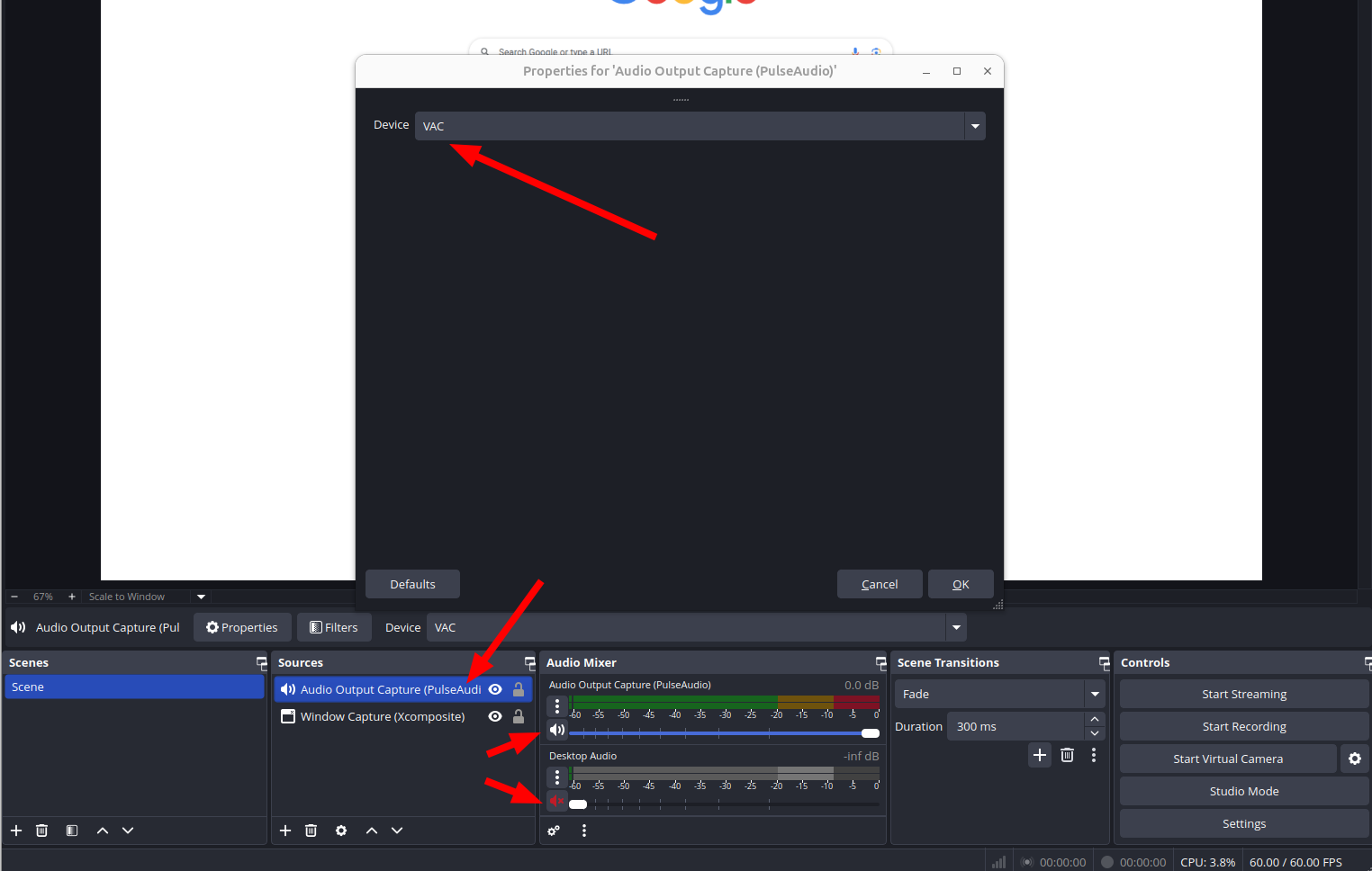
录制视频时,想要 obs 能录制声音,但是不想人耳听到。

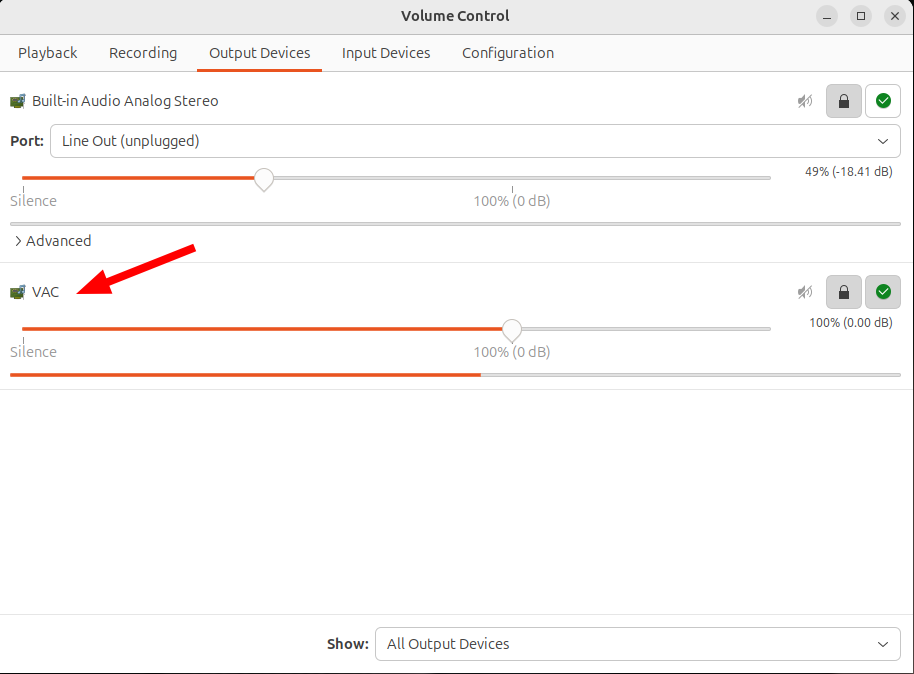
pactl load-module module-virtual-sink sink_name=VAC

unfortunately, Virtual audio sinks & settings gone after reboot

image-20250726071525899

image-20250726071325895


obs 无声录制带有声音的视频 [https://www.cnblogs.com/wztshine/p/17764073.html]

Virtual Audio Cable For Ubuntu [https://askubuntu.com/a/1268269/845522]

能不能设置个定时器,让录像自动停? [https://www.reddit.com/r/obs/comments/j5j1qa/comment/g7sk588/]

wget fetch a directory

1
$ wget -r -np -R "index.html*" http://example.com/configs/.vim/

Using wget to recursively fetch a directory with arbitrary files in it [https://stackoverflow.com/a/273776/8037585]

mount/umount ISO

1
2
$ sudo mount -t auto -o loop /path/to/matlab.iso /mnt/matlab
$ umount /mnt/iso

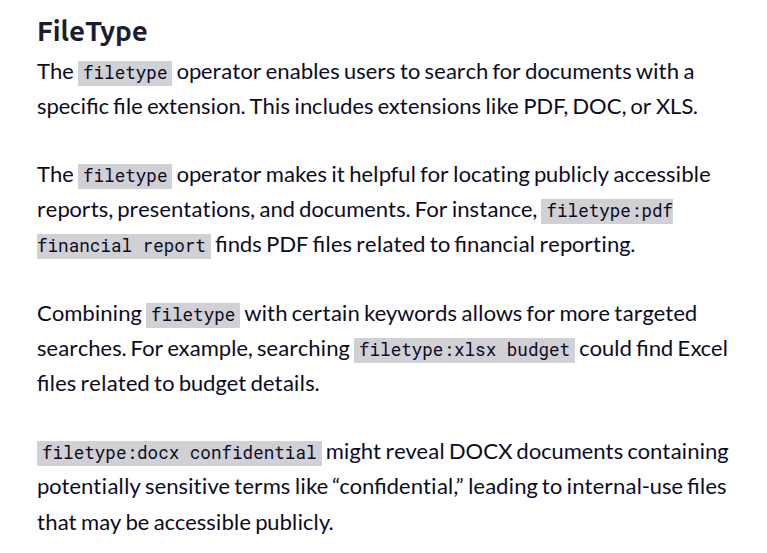
Google search tips

[https://static.googleusercontent.com/media/www.google.com/en//educators/downloads/Tips_Tricks_17x22.pdf]

image-20250706091436326

image-20250706091838077

Restart Xfce panel

1
xfce4-panel -r

[https://askubuntu.com/a/891209]

Rocky Linux 8 rpm for cadence binary and cdnshelp

qt5 and openssl

1
sudo yum install openssl compat-openssl10 qca-qt5-ossl.x86_64 openssl-devel

library preparation for EDA installation

1
2
3
4
5
6
7
8
9
10
11
12
13
14
15
16
17
18
19
20
21
22
23
24
25
26
27
28
29
30
31
32
33
34
35
36
37
38
39
40
41
42
43
44
45
46
47
48
49
50
51
52
53
54
libc6, gdb
dc
libncurses5-dev
libncurses5-dev:i386
g++
pstack
libelf1:i386
libgcc-4.8-dev:i386
libstdc++6:i386
gcc-multilib
g++-multilib
libc6-dbg
libc6-dbg:i386
libexpat-dev
libexpat-dev:i386libxss-dev
libxpm4
libxpm4:i386
libmng2
libxss-dev:i386
libxft2
libxft2:i386
libxmu6
libxmu6:i386
libjpeg62-dev
libjpeg62-dev:i386
gnome-core
gnome-core:i386
xfce4
libxml2:i386
libxml2, libXft-dev
libXft-dev:i386
libSM
libSM:i386
libpng3
libpng3:i386
libxi6
libxi6:i386
glibc.i686
libX11.i686
libX11-devel.i686
libX11-devel.x86_64
gcc-c++
compat-readline5
libXext.i686
libXtst.i686
redhat-lsb.i686
libXrender.i686
glibc-devel.i686
zlib.i686
ncompress.x86_64
ksh
openmotif22.i686
openmotif22.x86_64
xterm

Rocky Linux 8 extend LVM in VMware

1
2
3
4
5
6
7
8
9
10
11
12
13
14
15
16
17
18
19
20
21
22
23
24
25
26
27
28
29
30
31
32
33
34
35
36
37
38
39
40
41
42
43
44
45
46
47
48
1) gparted extend
2)
lvextend -l +100%FREE /dev/rl/root
3)
xfs_growfs /dev/mapper/rl-root

usefull command:
df -h
lvdisplay
fdisk -l

-----------------------------------------------------------
https://pocketadmin.tech/en/centos-8-extend-lvm/

$ sudo lvdisplay
--- Logical volume ---
LV Path /dev/rl/swap
LV Name swap
VG Name rl
LV UUID toZKEu-P5oV-6WOV-026Z-eFnI-xaSP-FgEbz5
LV Write Access read/write
LV Creation host, time myserver, 2021-12-03 21:28:03 +0800
LV Status available
# open 2
LV Size 5.00 GiB
Current LE 1280
Segments 1
Allocation inherit
Read ahead sectors auto
- currently set to 8192
Block device 253:1

--- Logical volume ---
LV Path /dev/rl/root
LV Name root
VG Name rl
LV UUID S2soRE-umc7-Z6b3-i44x-TiBO-ulnk-ETgEoj
LV Write Access read/write
LV Creation host, time myserver, 2021-12-03 21:28:03 +0800
LV Status available
# open 1
LV Size <194.00 GiB
Current LE 49663
Segments 1
Allocation inherit
Read ahead sectors auto
- currently set to 8192
Block device 253:0

compile vim from source with GUI support

1
2
3
4
# gtk3 in Rocky Linux 8.5
./configure --with-features=huge --enable-gui=gtk3 --enable-python3interp --prefix=/usr
make -j`nproc`
sudo make install

binkey

Inserting a new line below: o

above: O

To insert before the cursor: i

After: a

Before the line (home): I

Append at the end of line: A

network connection using nmcli

Problem

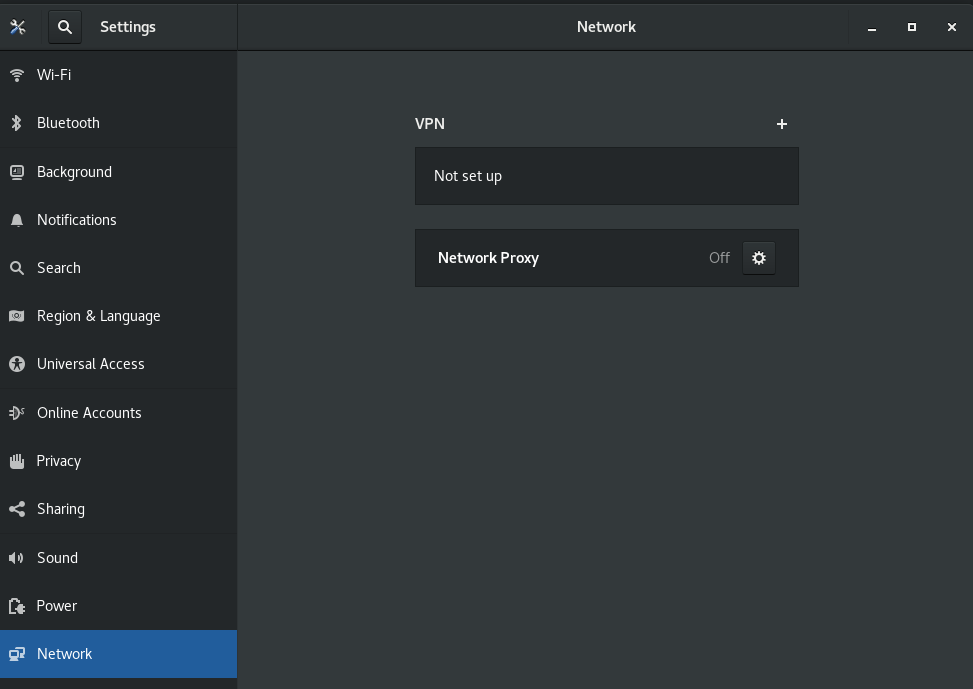
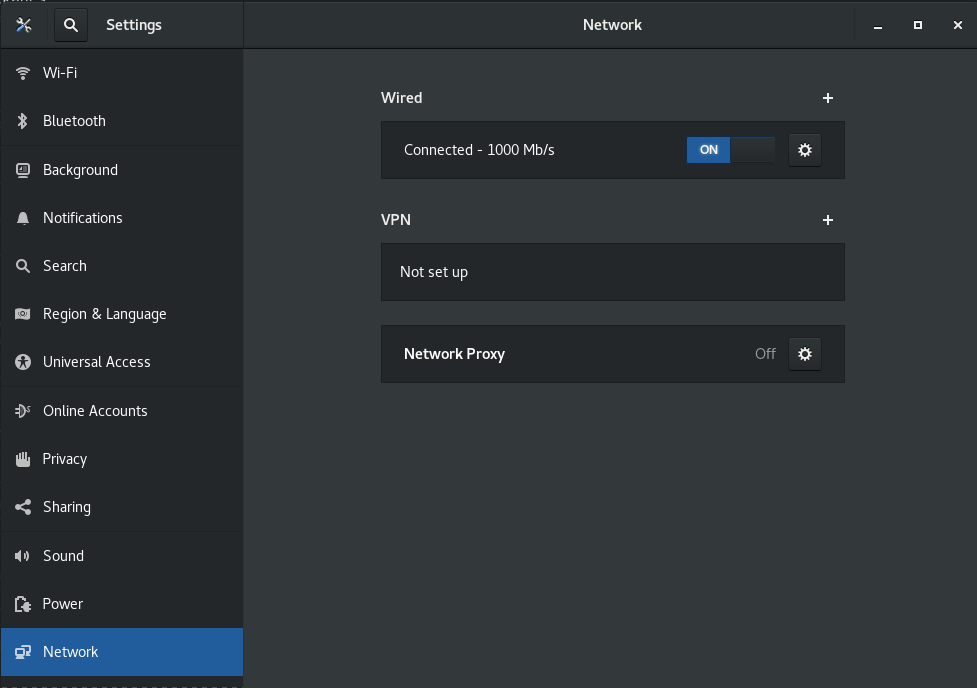
There is no network connection and device is not managed

1
2
3
4
$ nmcli device status
DEVICE TYPE STATE CONNECTION
eth0 ethernet unmanaged --
lo loopback unmanaged --

image-20220401011509900

solution

1
sudo nmcli networking on

Then, eth0 is connected

1
2
3
4
$ nmcli device status
DEVICE TYPE STATE CONNECTION
eth0 ethernet connected Ethernet connection 1
lo loopback unmanaged --

image-20220401011543866

What is the proper method to remove old kernels from a Red Hat Enterprise Linux system?

Red Hat Enterprise Linux 8

The YUM version 4 (based on the upstream DNF project) method for removing kernels and keeping only the latest version and running kernel:

1
$ yum remove --oldinstallonly

From the yum man page:

1
2
3
dnf [options] remove --oldinstallonly
Removes old installonly packages, keeping only latest versions and version of running
kernel.

New windows and forms appear behind the Library Manager in background when using GNOME 3

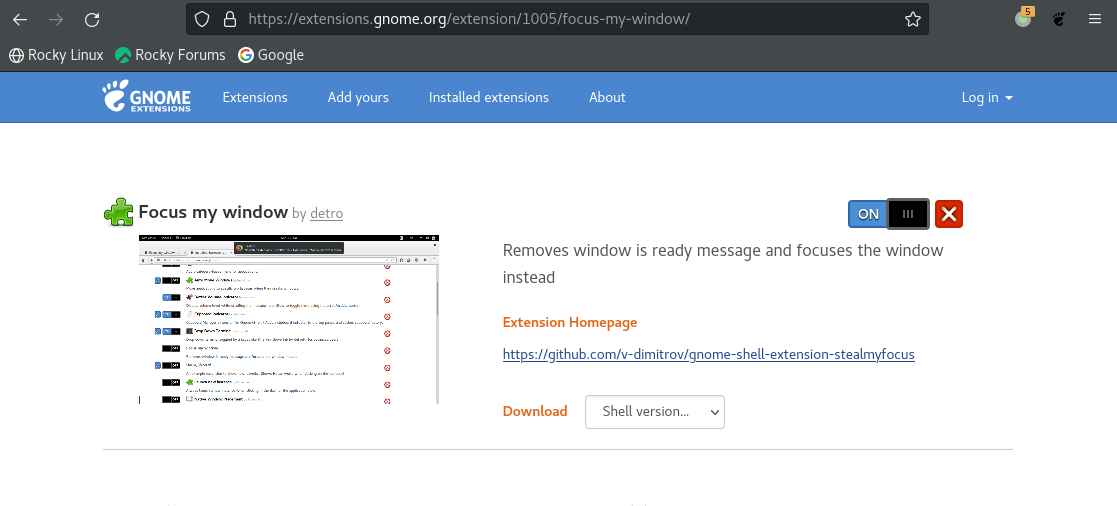
Using Red Hat Enterprise Linux 8, Rocky Linux 8 and the GNOME 3 window manager, the new Virtuoso Schematic/Layout/ADE windows and forms sometimes pop up under or below the Library Manager or on the desktop in the background instead of the foreground and cannot be seen. Sometimes, they are iconized; they do not come on the top in front, though it is the most recent window opened.

solution

Install Focus my window GNOME Shell extension

image-20221022002952578

reference

Article (11612426) Title: New windows and forms appear behind the Library Manager in background or iconized instead of foreground on RHEL and SuSE Linux in GNOME, KDE Desktop, Metacity window manager

VMware Disk Shrink

In Guest OS and run

1
sudo vmware-toolbox-cmd disk shrink /

https://superuser.com/q/211798

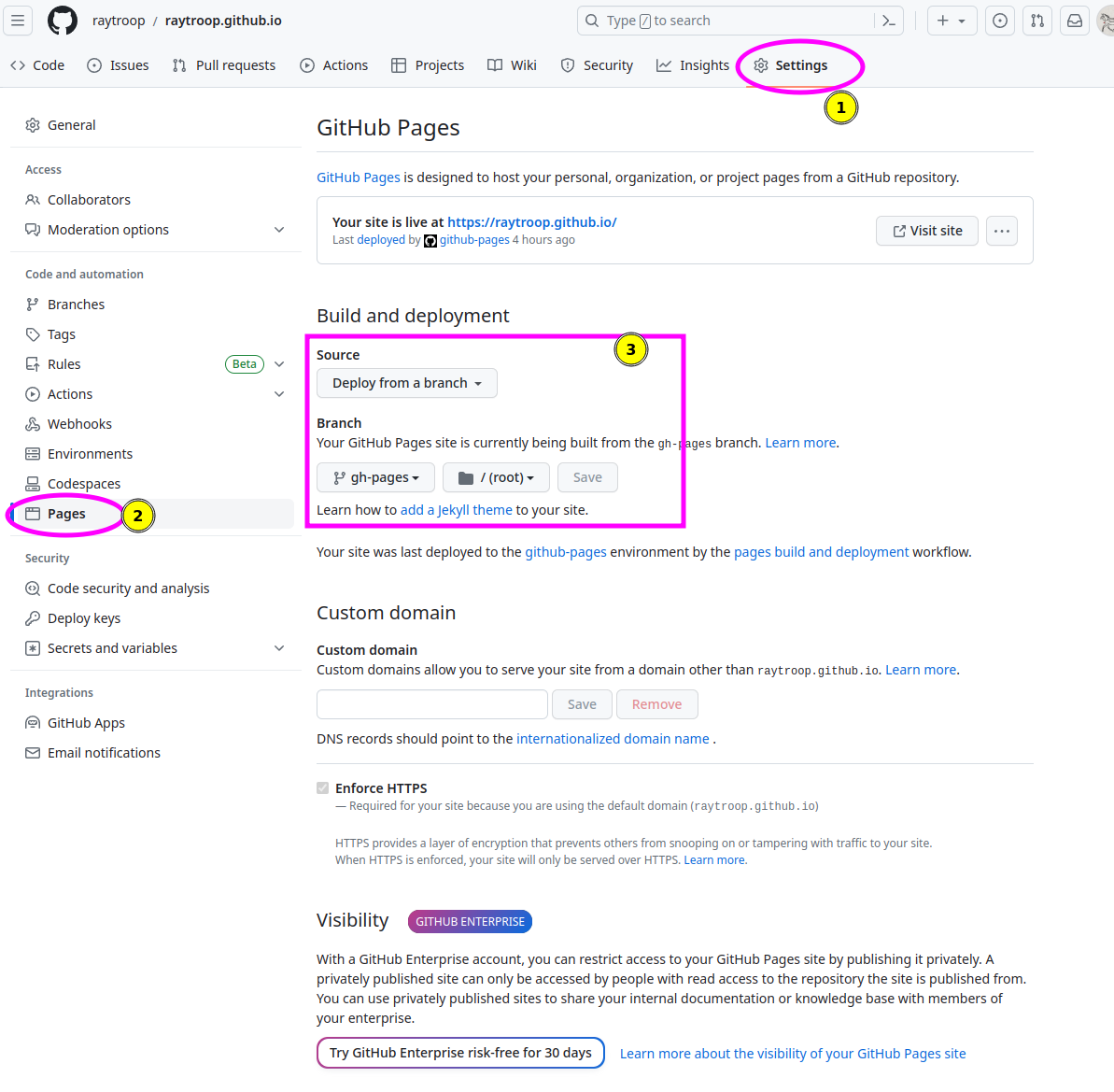
GitHub Pages Build and deployment

The repository visibility shall be public

image-20230701142405404

squash all git commits into one?

https://stackoverflow.com/a/9254257/8037585

As of git 1.6.2, you can use git rebase --root -i

For each commit except the first, change pick to squash.

this works find, but I had to do a forced push. be careful! git push -f

Build VMware host modules

1
2
3
4
5
6
7
8
git clone git@github.com:mkubecek/vmware-host-modules.git
cd vmware-host-modules/
git checkout origin/workstation-17.0.2
make -j`nproc`
sudo make install
sudo modprobe -v vmmon
sudo modprobe -v vmnet
sudo vmware-networks --start

AWT-EventQueue-0 Matlab

1
Renaming libstdc++.so.6 to libstdc++.so.6old solved it for me in MATLAB 2021B UBUNTU 20.04. Thanks!

[https://www.mathworks.com/matlabcentral/answers/329796-issue-with-libstdc-so-6#comment_2316900]

0%